
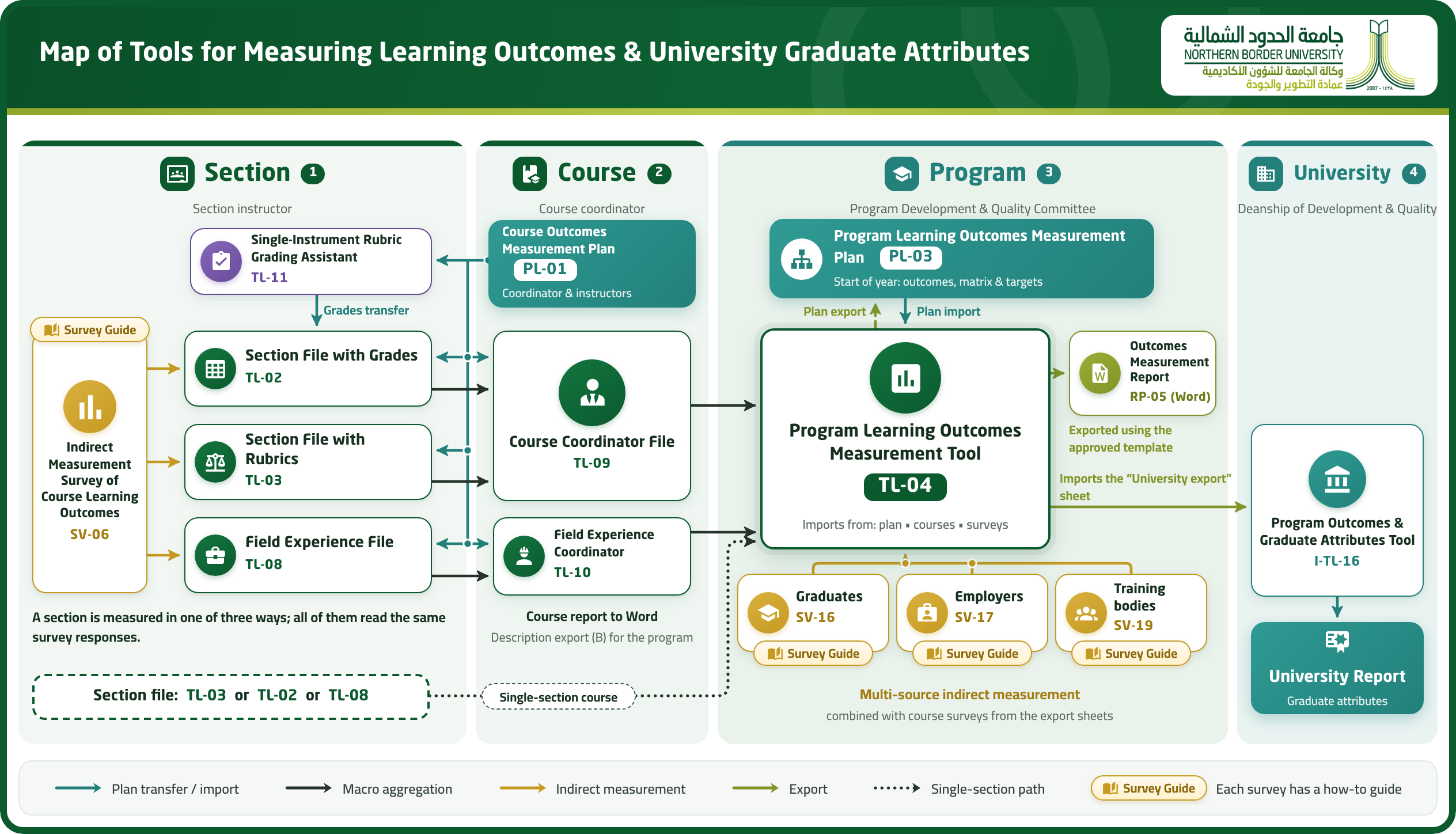
This page presents the university’s approved toolkit for measuring learning outcomes, from the section and course, through the program, up to university graduate attributes. The map shows how data flows between the tools, followed by a short guide to each tool with a link to its folder and a video on how to use it.
Before You Start
Two short videos we recommend watching before using the tools.
| Video | What it covers | Watch |
|---|---|---|
| Tools Map Overview | An overview of the full toolkit for measuring course and program learning outcomes and graduate attributes, showing how results move between the section, course, program and university levels. Watch it first to see the whole picture. |
|
| Excel Technical Tips | Practical tips for working with the Excel files of the measurement tools. Recommended before using the tools for the first time. |
|

Tools Guide
Pick a tool, then open its folder to download the approved file, or watch the video to learn how to use it.
| Code | Tool | Summary | Links |
|---|---|---|---|
| Part 1: Section and Course Tools | |||
| PL-01 DDQ-C-PL-01 | Course Learning Outcomes (CLOs) Measurement Plan Tool Level: Course | An Excel tool in which the course coordinator builds the measurement plan directly from the approved course specification: it imports from the specification file (Word) the course information, its outcomes and their alignment with program outcomes, its topics and contact hours, and its assessment activities. It weights each outcome from contact hours, checks that assessment marks are distributed across outcomes according to those weights, and compares the plan with the specification item by item, documenting the reason for any deviation. The section files and the coordinator file import it, so all sections are measured against the same plan. Responsible: Course coordinator with section instructors • Timing: Start of each semester in which the course is offered |
|
| TL-11 DDQ-C-TL-11 | Rubric Assessment Measurement Assistant Level: Section | An Excel helper for a single assessment scored with a rubric in a course measured by marks. It imports the assessment, its outcomes and marks from the course plan (PL-01), builds the rubric from the plan or from a library of 26 ready-made rubrics, and prints it for students before assessment. It then converts performance levels into marks that are transferred to the section file (TL-02), so grading is fair and consistent and every criterion is linked to a single outcome. Responsible: Section faculty member (data entry) • Timing: During the semester, when the assessment is graded |
|
| TL-02 DDQ-C-TL-02 | Course Learning Outcomes Measurement Tool – Section File (Grades) Level: Section | A standard section file for courses assessed by marks. It imports the course plan (PL-01), so outcomes, assessments and their marks arrive exactly as approved with no re-entry. Student names and university IDs are pasted from the university system, marks are recorded as the semester progresses, and then the SV-06 survey responses are added. It automatically computes direct and indirect attainment of each outcome against department targets, prepares the course report and the export row for the coordinator file, and a "File status" panel flags anything missing without stopping the work. Responsible: Section faculty member (data entry) • Timing: Throughout the semester (ongoing entry) |
Part 1: Direct
Part 2: Indirect & report
|
| TL-03 DDQ-C-TL-03 | Course Learning Outcomes Measurement Tool – Section File (Rubrics) Level: Section | A standard section file for courses assessed with rubrics, such as the graduation project. It imports the course plan (PL-01) and checks it against the specification, links each criterion to a single outcome, offers a library of ready-made rubrics and printing of the rubric for students, and supports individual and group assessment and multi-assessor committees. It then computes marks and direct and indirect measures (SV-06), and prepares the course report and the export row. Responsible: Section faculty member (data entry) • Timing: Throughout the semester (ongoing entry) |
|
| TL-08 DDQ-C-TL-08 | Course Learning Outcomes Measurement Tool – Section File (Field Experience) Level: Section | A standard section file for the field experience course that brings every assessor’s evaluation into one file. It imports the course plan (PL-01), exports a separate evaluation file for each training site’s field supervisor and imports it back, adds the academic supervisor’s and department committee’s assessments, and flags a site whose ratings stray far from the section average. It then measures outcomes directly and indirectly (SV-06), collects students’ ratings of training sites, and prepares the course report and the export row. Responsible: Section faculty member (data entry) • Timing: Throughout the semester (ongoing entry) |
|
| SV-06 DDQ-C-SV-06 | Indirect Measurement Survey of Course Learning Outcomes Level: Section | A standard survey for the course’s students that captures how well they believe they have achieved each course learning outcome. It is set up in Microsoft Forms from a ready-to-import file, and its responses are pasted as they are into the section file (TL-02, TL-03 or TL-08), which computes the indirect measure automatically; the results then carry forward to the course and the program. Responsible: Course coordinator (preparation) and section faculty member (administration) • Timing: End of each semester |
|
| TL-09 DDQ-C-TL-09 | Course Learning Outcomes Measurement Tool – Course Coordinator File Level: Course | An Excel file in which the course coordinator aggregates all section files (TL-02 and TL-03) in one step, skipping any unusable file and stating why (duplicate section, another course, or incomplete data), and applying one plan and one set of targets to all sections. It computes attainment from student counts across all sections rather than averaging section percentages, compares sections and flags large gaps, and collects audit notes. It then exports the course report to Word and export row (B), which the program measurement tool (TL-04) imports. Responsible: Course coordinator (aggregation) • Timing: End of each semester |
|
| TL-10 DDQ-C-TL-10 | Course Learning Outcomes Measurement Tool – Field Experience Coordinator File Level: Course | An Excel file in which the field experience coordinator aggregates the practicum section files (TL-08) in one step. It measures outcomes at course level from student counts across all sections, compares sections, and summarizes training-site ratings weighted by number of respondents, withholding results for sites with too few respondents to protect student confidentiality and flagging sites below acceptable thresholds. It then exports the course report to Word and the export row, which the program measurement tool (TL-04) imports. Responsible: Field experience coordinator (aggregation) • Timing: End of each semester |
|
| Part 2: Program Tools | |||
| PL-03 DDQ-P-PL-03 | Program Learning Outcomes (PLOs) Measurement Plan Level: Program | The program learning outcomes measurement plan, built automatically in the program measurement tool (TL-04) from the approved program specification (TP-151) and the course measurement plans (PL-01): the outcomes measured this year, the courses linked to each outcome and their contribution level (I/P/M), the measurement tools, and the targets, with a check that every outcome is covered. It is then exported to Word for approval and serves as a single reference for program measurement throughout the year. Responsible: Program Development & Quality Committee • Timing: Start of the academic year; updated as needed |
|
| TL-04 DDQ-P-TL-04 | Program Learning Outcomes Measurement Tool (Excel) Level: Program | A standard Excel file that governs program learning outcomes measurement across all programs. At the start of the year it imports the program specification and course plans and prepares the measurement plan (PL-03); at the end of the year it automatically imports the export rows of the course files and the responses of the graduate, employer and training-site surveys. For each outcome it computes the direct measure weighted by the course’s contribution level, the indirect measure, the weighted result (80 percent direct and 20 percent indirect) and measurement completeness, and exports report RP-05 and the "University export" sheet. Responsible: Program Development & Quality Committee • Timing: Start of the academic year (plan) and end of the year (measurement and report) |
Part 1: Preparing the plan
Part 2: Import & direct
Part 3: Indirect & report
|
| RP-05 DDQ-P-RP-05 | Program Learning Outcomes (PLOs) Measurement Report Level: Program | A report exported automatically to Word from the program measurement tool (TL-04) using the approved template, so results arrive without retyping: the direct and indirect attainment of each outcome, measurement completeness, strengths and areas for improvement, and the related improvement actions. Responsible: Program Development & Quality Committee • Timing: End of the academic year |
|
| SV-16 DDQ-P-SV-16 | Graduates Survey for Program Learning Outcomes Level: Program | A standard survey of program graduates that captures how well they believe they have achieved each program learning outcome. It is set up in Microsoft Forms from a ready-to-import file, and its responses are imported into the program measurement tool (TL-04) as an indirect measure that complements direct measurement. Responsible: Program Development & Quality Committee • Timing: Annually |
|
| SV-17 DDQ-P-SV-17 | Employers Survey for Program Learning Outcomes Level: Program | A standard survey of organizations that employ the program’s graduates, capturing how well graduates demonstrate the program learning outcomes in the workplace. It is set up in Microsoft Forms from a ready-to-import file, and its responses are imported into the program measurement tool (TL-04). Responsible: Program Development & Quality Committee • Timing: Annually |
|
| SV-19 DDQ-P-SV-19 | Training Bodies Survey for Program Learning Outcomes Level: Program | A standard survey of field (cooperative) training organizations, capturing how well trainees demonstrate the program learning outcomes. It is set up in Microsoft Forms from a ready-to-import file, and its responses are imported into the program measurement tool (TL-04). Responsible: Program Development & Quality Committee • Timing: End of each field training period |
|
| Part 3: University Tool | |||
| I-TL-16 DDQ-I-TL-16 | Program Learning Outcomes & University Graduate Attributes Tool (Excel) Level: University | An Excel file that imports the "University export" sheet of the program measurement tools (DDQ-P-TL-04) of all university programs in a standard format. It measures graduate attributes and learning outcomes by domain, college and study level, flags programs that need follow-up, and produces the university report (Word). Responsible: Deanship of Development & Quality • Timing: Annually, once program outcome measurement is complete |
|
| Supporting Reference | |||
| - | Survey Guide Level: All levels | A companion guide to the indirect measurement surveys (SV-06, SV-16, SV-17, SV-19): the purpose and target group of each survey, how to set it up in Microsoft Forms from the ready-to-import files, how to collect responses, and how to enter them into the right measurement tool. Responsible: Deanship of Development & Quality • Timing: Ongoing reference |
|


Note: for a single-section course, the section file (TL-03, TL-02 or TL-08) feeds directly into the program measurement tool (TL-04).